Accessibility & Usability Audit for Demetrius Association

Accessibility & Usability Audit for Demetrius Association

Role

UX Researcher & Implementation Support

Timeline

January - April 2025

Duration

4 weeks

(March - April 2026)

Tools

Google Sheets, Browser DevTools, WebAIM Contrast Checker

Context

NGO that depends on its website to be understood

Demetrius is a Romanian NGO promoting human rights, civic participation, and social inclusion. They depend on their website to inform the public, and build community trust.


While not legally required to meet the European Accessibility Act (2025), improving accessibility directly serves the people they exist to help.


The goal was to deliver findings in plain language, with clear recommendations they could actually act on.

Context

NGO that depends on its website to be understood

Demetrius is a Romanian NGO promoting human rights, civic participation, and social inclusion. They depend on their website to inform the public, and build community trust.


While not legally required to meet the European Accessibility Act (2025), improving accessibility directly serves the people they exist to help.


The goal was to deliver findings in plain language, with clear recommendations they could actually act on.

Approach

How I evaluated it

Two evaluation frameworks

  1. WCAG 2.1 AA

    Perceivable: color contrast, alt text, text alternatives for images

    Operable: keyboard navigation, focus indicators, skip links

    Understandable: consistent navigation, readable content, form labels

    Robust: semantic HTML, heading hierarchy


  2. Nielsen's 10 Usability Heuristics

    Wayfinding and orientation

    Content clarity and readability

    Consistency and visual standards

    Error prevention

Manual validation methods

  • Browser DevTools inspect

  • Keyboard navigation testing

  • WebAIM Contrast Checker

Approach

How I evaluated it

Two evaluation frameworks

  1. WCAG 2.1 AA

    Perceivable: color contrast, alt text, text alternatives for images

    Operable: keyboard navigation, focus indicators, skip links

    Understandable: consistent navigation, readable content, form labels

    Robust: semantic HTML, heading hierarchy


  2. Nielsen's 10 Usability Heuristics

    Wayfinding and orientation

    Content clarity and readability

    Consistency and visual standards

    Error prevention

Manual validation methods

  • Browser DevTools inspect

  • Keyboard navigation testing

  • WebAIM Contrast Checker

Key Findings

The gaps that matter most

  1. Text contrast fails in multiple places

Several areas fall below WCAG minimums, affecting readability for all users not only those with visual impairments.

  1. Images are invisible to assistive technologies

Problem

Informative images have no alt text.


Posters and newsletters are published as flat images with text embedded inside.


This affects both users who rely on assistive technologies and search engine visibility.

Solution

Add descriptive alt text to informative images.


Set alt="" on decorative ones.


For posters: add a text version below the image.

Images with text embbeded inside

  1. Project pages are inconsistent

Problem: I compared three project pages and each has a different layout, different content structure, and the navigation menu changes color per page. Users lose orientation.


Heading levels skip (H1 → H3, H4 on homepage), breaking screen reader navigation.

Solution: One template for all project pages. Consistent color and consistent heading order.

Key Findings

The gaps that matter most

  1. Text contrast fails in multiple places

Several areas fall below WCAG minimums, affecting readability for all users not only those with visual impairments.

  1. Images are invisible to assistive technologies

Problem

Informative images have no alt text.


Posters and newsletters are published as flat images with text embedded inside.


This affects both users who rely on assistive technologies and search engine visibility.

Solution

Add descriptive alt text to informative images.


Set alt="" on decorative ones.


For posters: add a text version below the image.

Images with text embbeded inside

  1. Project pages are inconsistent

Problem: I compared three project pages and each has a different layout, different content structure, and the navigation menu changes color per page. Users lose orientation.


Heading levels skip (H1 → H3, H4 on homepage), breaking screen reader navigation.

Solution: One template for all project pages. Consistent color and consistent heading order.

Recommendations

Impact over effort

  • Fix text contrast on navigation and CTA buttons

  • Add alt text: can be done directly in WordPress, no developer needed

  • Fix the broken links

  • Create a single project page template

  • Correct heading hierarchy across all pages

  • Add a skip link for keyboard navigation

IMPLEMENTATION

From audit to actual changes

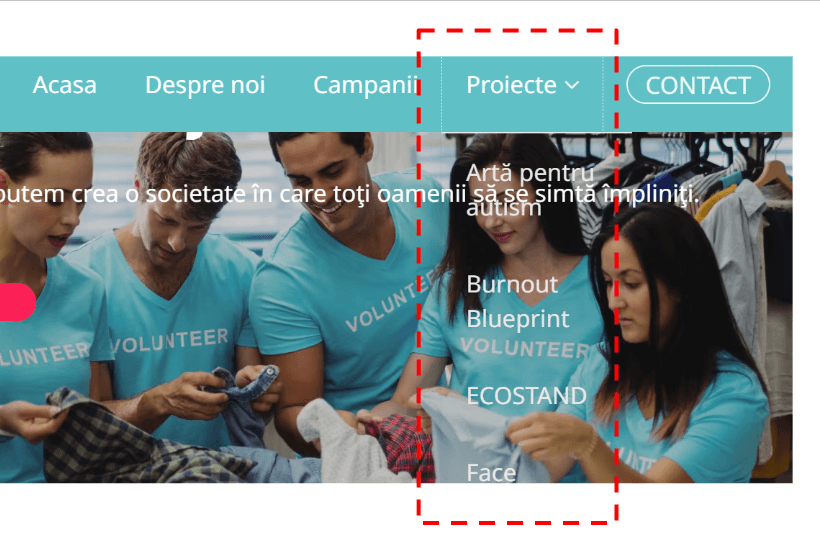
After delivering the report, I helped implement some of the highest-impact fixes directly in WordPress:


  • Removed the auto-playing image carousel on the homepage reducing visual distraction and improving focus on the main content


  • Corrected semantic heading structure across key pages headings now follow a logical H1 → H2 → H3 order


  • Improved text contrast in the navigation and body text areas flagged in the audit


  • Renamed links to be descriptive replacing generic URLs with readable labels

Before
After

Impact

Why it matters for an NGO

Wider audience reach: an estimated 1 in 6 people live with some form of disability. Accessibility barriers silently exclude part of the audience the association is trying to reach.


Search visibility: images with alt text become indexable. A free, passive SEO gain from fixes already made.


Credibility: a site that's consistent, readable, and legally complete signals that the organization is serious. That matters when the website is the first impression.

Learnings

What this project taught me

Presenting all of the issues I found would have been overwhelming and unhelpful. I selected the ones that, once fixed, would make the most noticeable difference to anyone using the site and filtered for what could be done without a developer


The findings had to make sense to someone who had never heard of WCAG. That meant describing what each issue actually does to a real person on the site, not citing a standard. Writing that way also forced me to be clearer about why something mattered, which made the recommendations easier to act on.

©2026 Alexandra Honceriu

©2026 Alexandra Honceriu

©2026 Alexandra Honceriu