"How many months do we have left?"
"How many months do we have left?"
Budget app designed for people living off savings or irregular incomes
Role
UI/UX Designer
Solo project, no team
Duration
4 weeks (March - April 2026)
Duration
4 weeks
(March - April 2026)
Tools
Figma
Body of contents
Body of contents
Context
Designed from lived experience
My partner and I are both freelancing, living off savings with no fixed monthly income. This app started from my own frustration.
I had a system: a 3-sheet Excel file for cashflow projections and budget planning, a separate app where each of us tracked expenses, and a monthly ritual of consolidating everything by hand. It worked, technically.
But it was time-consuming, and looking up our runway mid-month meant opening Excel every single time.
Context
Designed from lived experience
My partner and I are both freelancing, living off savings with no fixed monthly income. This app started from my own frustration.
I had a system: a 3-sheet Excel file for cashflow projections and budget planning, a separate app where each of us tracked expenses, and a monthly ritual of consolidating everything by hand. It worked, technically.
But it was time-consuming, and looking up our runway mid-month meant opening Excel every single time.
PROBLEM
The tools existed. None of them were built for us
Most budgeting apps assume a salary and bank integration. For people living off savings, couples or individuals with irregular income, those tools solve the wrong problem entirely.
People with irregular incomes or living off savings have no simple way to track their finances and know how long their money will last.
Designing from my own household meant I had direct access to two people using the same product with completely different needs:
one who manages anxiety through detail and control
one who needs a single number and nothing more.
If I knew we had enough for a few months, I would relax. I just want to know we're okay
- partner & primary research subject
PROBLEM
The tools existed. None of them were built for us
Most budgeting apps assume a salary and bank integration. For people living off savings, couples or individuals with irregular income, those tools solve the wrong problem entirely.
People with irregular incomes or living off savings have no simple way to track their finances and know how long their money will last.
Designing from my own household meant I had direct access to two people using the same product with completely different needs:
one who manages anxiety through detail and control
one who needs a single number and nothing more.
If I knew we had enough for a few months, I would relax. I just want to know we're okay
- partner & primary research subject
SOLUTION GLIMPSE
Home
Home
Users know their runway the moment they open the app
Users know their runway the moment they open the app
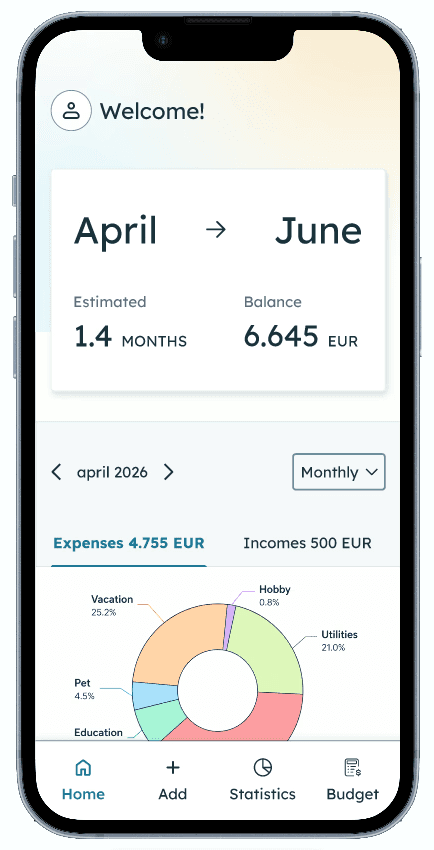
A single card shows the starting month, end month, estimated runway in months, and current balance
The runway updates in real time, after each transaction added
Screen is optimised for the user who needs two numbers and nothing more. The user who needs the full picture can navigate deeper
A quick-glance summary sits below, no need to navigate to Statistics for a monthly overview
Add transaction
Add transaction
Logging a transaction takes seconds; switch between expense and income with a single tap
Logging a transaction takes seconds; switch between expense and income with a single tap
Statistics
Statistics
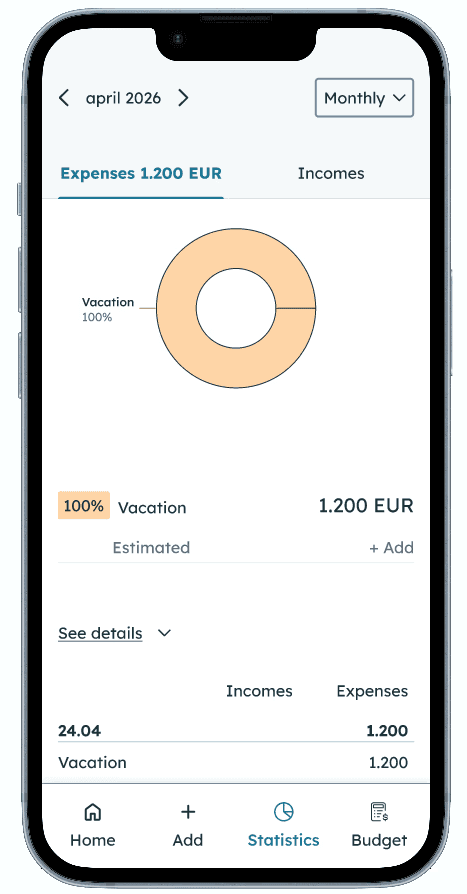
Monthly expenses and incomes broken down by category to see exactly where the money went
Monthly expenses and incomes broken down by category to see exactly where the money went
Budget
Budget
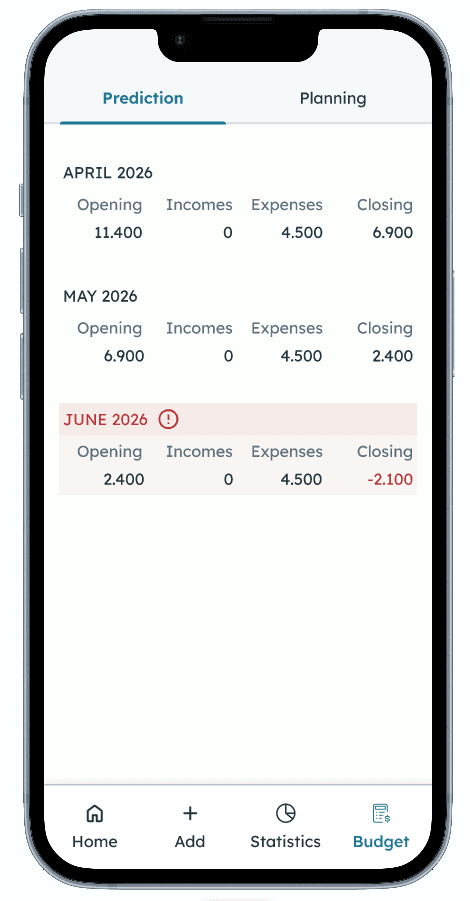
Prediction shows how long the money will last based on the monthly cashflow.
It starts from onboarding inputs and is updated monthly either manually by the user or automatically using logged income and expenses.
Planning: Users can set their expected income and expenses for the upcoming months.
SOLUTION GLIMPSE
Home
Users know their runway the moment they open the app
A single card shows the starting month, end month, estimated runway in months, and current balance
The runway updates in real time, after each transaction added
Screen is optimised for the user who needs two numbers and nothing more. The user who needs the full picture can navigate deeper
A quick-glance summary sits below, no need to navigate to Statistics for a monthly overview
Add transaction
Logging a transaction takes seconds; switch between expense and income with a single tap
Statistics
Monthly expenses and incomes broken down by category to see exactly where the money went
Budget
Prediction shows how long the money will last based on the monthly cashflow.
It starts from onboarding inputs and is updated monthly either manually by the user or automatically using logged income and expenses.
Planning: Users can set their expected income and expenses for the upcoming months.
EXPLORATIONS
Decisions that changed the shape of the app
Accuracy without bank integration: the recalibration logic
Problem: the app is only as accurate as what users log.
Bank integration would solve this but it adds complexity and privacy concerns, making the MVP significantly harder to ship.
Solution: a monthly recalibration.
At the end of the month, the app prompts users to verify their real balance.
Any difference between what the app shows and reality is logged as an adjustment.
The next month starts with the correct opening balance, and the runway recalculates from there.
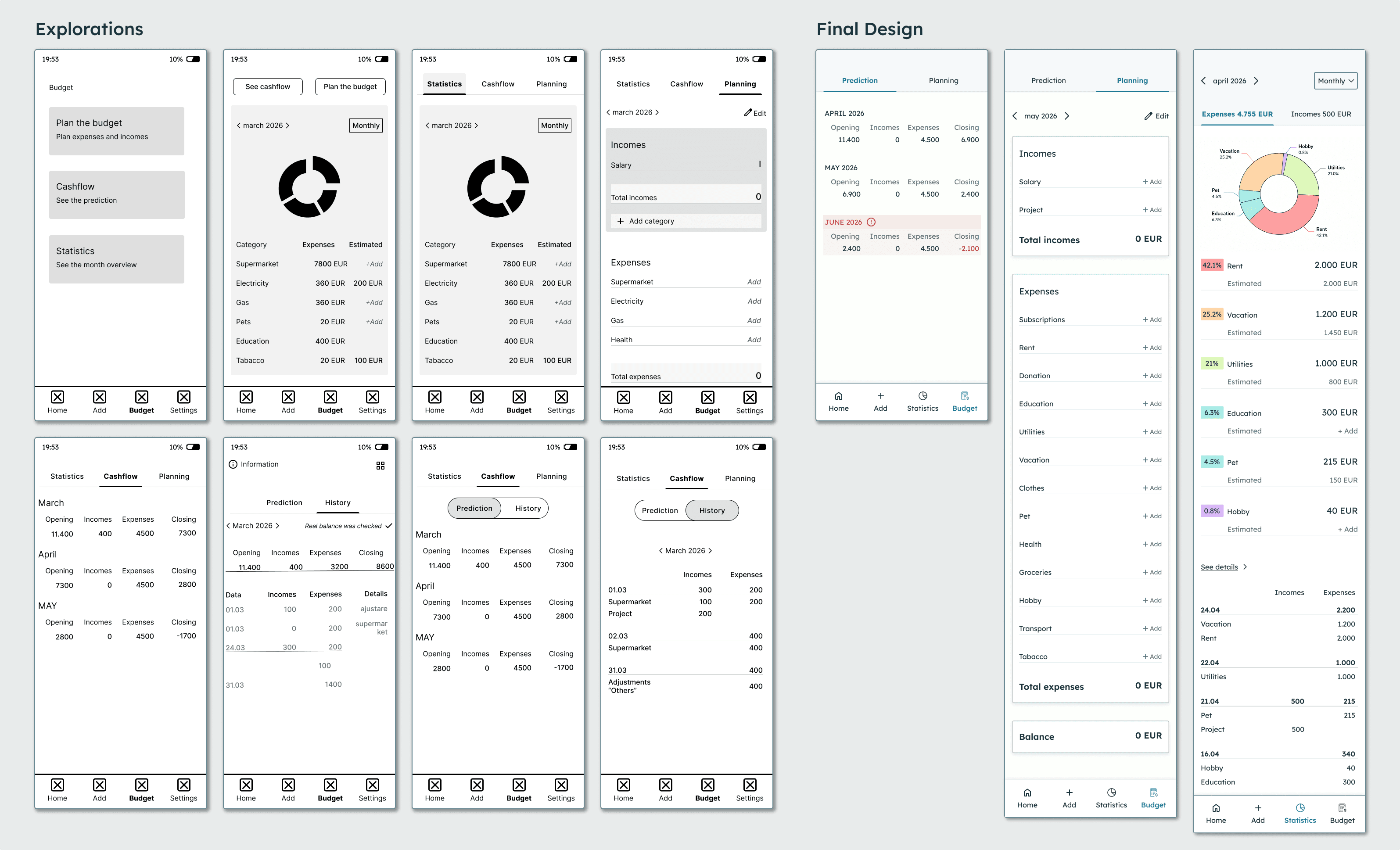
Budget tab: finding the right structure through multiple iterations
Problem: contain everything money-related in one place
Early versions grouped prediction, history, planning, and statistics into three tabs, with an extra toggle inside one of them.
On mobile, that meant going through two layers of navigation just to see a cashflow projection.
The more features I added, the harder the app became to use.
Solution: separate past from future.
Each iteration removed one layer of confusion, reducing the number of taps to get anywhere.
Statistics and transaction history both look at the past, so they were grouped together in their own tab in the bottom navigation.
Budget focuses on the future and is split into two tabs: Planning, where you set upcoming income and expenses, and Prediction, where you see how long your money will last.
Reducing friction before the first moment of value
Problem: users don't always know what they want before they've seen the product. First onboarding variant asked users about their financial goals upfront and configured the home screen based on their answers.
Solution: asks only what the app needs to function.
EXPLORATIONS
Decisions that changed the shape of the app
Accuracy without bank integration: the recalibration logic
Problem: the app is only as accurate as what users log.
Bank integration would solve this but it adds complexity and privacy concerns, making the MVP significantly harder to ship.
Solution: a monthly recalibration.
At the end of the month, the app prompts users to verify their real balance.
Any difference between what the app shows and reality is logged as an adjustment.
The next month starts with the correct opening balance, and the runway recalculates from there.
Budget tab: finding the right structure through multiple iterations
Problem: contain everything money-related in one place
Early versions grouped prediction, history, planning, and statistics into three tabs, with an extra toggle inside one of them.
On mobile, that meant going through two layers of navigation just to see a cashflow projection.
The more features I added, the harder the app became to use.
Solution: separate past from future.
Each iteration removed one layer of confusion, reducing the number of taps to get anywhere.
Statistics and transaction history both look at the past, so they were grouped together in their own tab in the bottom navigation.
Budget focuses on the future and is split into two tabs: Planning, where you set upcoming income and expenses, and Prediction, where you see how long your money will last.
Reducing friction before the first moment of value
Problem: users don't always know what they want before they've seen the product. First onboarding variant asked users about their financial goals upfront and configured the home screen based on their answers.
Solution: asks only what the app needs to function.
Learnings and tradeoffs
The logic took longer than the UI
No bank integration creates friction. Every transaction requires the user to open the app and log it manually. Bank integration would reduce that effort, but adds backend complexity, privacy concerns, and makes the MVP significantly harder to ship.
Manual entry risks accuracy. The app is only as accurate as what users log. If a transaction is missed, the runway number drifts. That's a real product risk, and it was accepted deliberately. The recalibration flow is the safety net, not a perfect solution.
The logic took longer than the UI. The complex part was figuring out how the app stays accurate over time and what happens at the end of each month.
I had to sketch out different scenarios, walk through month-end situations, and test the recalibration logic before drawing a single screen. Otherwise, I would’ve ended up with something that looks good but breaks in real use.
What's next
Recalibration flow
The logic is mapped and validated in the user flow diagram.
Recalibration flow
The logic is mapped and validated in the user flow diagram.
Usability testing
Testing with real users representing both personas. Does the runway card communicate value immediately to someone who has never seen the app?
Usability testing
Testing with real users representing both personas. Does the runway card communicate value immediately to someone who has never seen the app?
Live product
The goal is to move from prototype to a real app. Based on results from usability testing, the design will be refined before development starts.
Live product
The goal is to move from prototype to a real app. Based on results from usability testing, the design will be refined before development starts.